Pomo compared with Be FocusedPomodoro timer comparison, November 2026
Be Focused is a task-based Pomodoro timer with a long record on the App Store and a free tier paid for by advertising. Pomo has no task list and no ads. This leaflet sets the two side by side, with the date on which the comparison was made.
Be Focused, in brief
Be Focused is made by Xwavesoft and describes itself as a focus timer for work and study. It runs on iPhone, iPad, Apple Watch and Apple Vision, with a separate Mac app, and one Pro purchase unlocks all of them. The timer is built around tasks: you make a list, pick a task, and run intervals against it. The free tier carries ads; Pro is listed at $2.99 a month, $19.99 a year or $39.99 for life on the US App Store in November 2026, and it adds iCloud sync and site blocking among other things. Be Focused is rated 4.7 stars from about 4,300 US ratings on iOS as listed in November 2026, and it has been The Sweet Setup's long-standing pick for Mac and iOS. It suits people who want the to-do list and the timer in one window.
Side by side
| Pomo | Be Focused | |
|---|---|---|
| Platforms | Mac, iPhone, iPad, Apple Watch | iPhone, iPad, Apple Watch, Apple Vision; a separate Mac app |
| Price of the free tier | Free; everything in the manual | Free, with ads; timer and tasks |
| Paid tier and price | None. Everything is free, with no in-app purchases | Pro: $2.99 a month, $19.99 a year, $39.99 for life (US listing); one purchase for all devices |
| Timer sync across devices | No. The record syncs; each device runs its own timer | Not checked |
| Statistics | Day, week, month, year; hours by session name; change against the period before | Not checked |
| Streaks | Daily use stamp; one session every three days keeps it | Not checked |
| iCloud or cloud sync | iCloud, record only, no account | iCloud sync, Pro |
| Calendar export | Apple Calendar, by hand or automatically | Not checked |
| CSV export | CSV and text | Not checked |
| App blocking | Yes, Mac only | Not checked |
| Website blocking | Yes, Mac only; Safari, Chrome, Arc, Brave, Edge, Vivaldi, Opera | Site blocking, Pro |
| Apple Watch | Start, pause, skip; haptic tap | Yes |
| Widgets and Live Activity | Home Screen widget; Live Activity with pause | Not checked |
| Task list | None; session names only | Yes; the timer runs against tasks |
| Account required | No | Not checked |
| Ads in free tier | No | Yes |
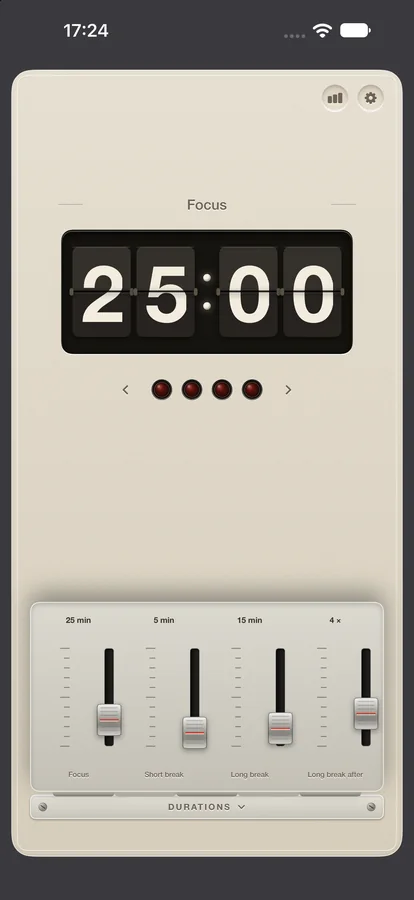
| Design | Split-flap display, four lamps, one red button; set like an owner's manual | Task list with a timer; a menu bar timer on the Mac |
Compared on 2 November 2026. Pomo's column is from this manual. Be Focused's column is from its public App Store listing as read on that date; details change, and a cell marked not checked means the point was not read for this leaflet. Pro in red marks a feature the other app sells in its paid tier.
Where Be Focused is better
Be Focused has a task list and Pomo does not. If you want to write the day's tasks into the timer, work them in order and see each one's intervals, Be Focused does that and Pomo offers only a name on the nameplate.
Be Focused has about 4,300 ratings on the US App Store, has been recommended by The Sweet Setup for years, and runs on Apple Vision. Pomo is awaiting its first App Review and has no ratings yet.
One Pro purchase covers the iPhone, iPad, Watch and the separate Mac app, and the lifetime price is a single payment. Pomo has no paid tier at all, so there is nothing to compare on that point.
Where Pomo is better
Pomo shows no advertising. The free app is the whole app: the timer, the record of use, the streak, iCloud sync, Apple Calendar and CSV export, and on the Mac the app and website blocker with commitment mode. In Be Focused, iCloud sync and site blocking are Pro.
Pomo's blocker also hides apps on the Mac while a session runs, and turns websites away in Safari, Chrome, Arc, Brave, Edge, Vivaldi and Opera. The record syncs through iCloud with no account to make. On iPhone, the countdown stays on the Lock Screen and in the Dynamic Island with a pause button, and the Home Screen widget shows the streak with today's count.
Reviews of Be Focused listed in November 2026 mention a loud default alarm and alarms that stay silent with the ringer off. Pomo's bell is a notification on iPhone and iPad and rings whether the app is open or not; the service counter explains the switches.
Which to choose
Choose Be Focused if you want the task list inside the timer and do not mind ads or a Pro purchase for sync and blocking. Choose Pomo if you keep your tasks elsewhere, want sync, export and the Mac blocker without paying, and would rather see no ads at all. Pomo is awaiting App Review in November 2026.
Be Focused's CSV export can be read into Pomo as a spreadsheet: the Import button on the record card takes any sheet with a date, a start and a length. Task names become session titles, and the hours by name appear in the record.