Distractions kept outApp and website blocker for the Mac
The Mac version of Pomo carries a list of apps and websites that stay shut while you focus. During a session, an app on the list is hidden the moment it comes to the front, and a website on the list is turned away at the door. When the break starts, everything is let back in. The blocker is part of the free Mac app.
How the door works
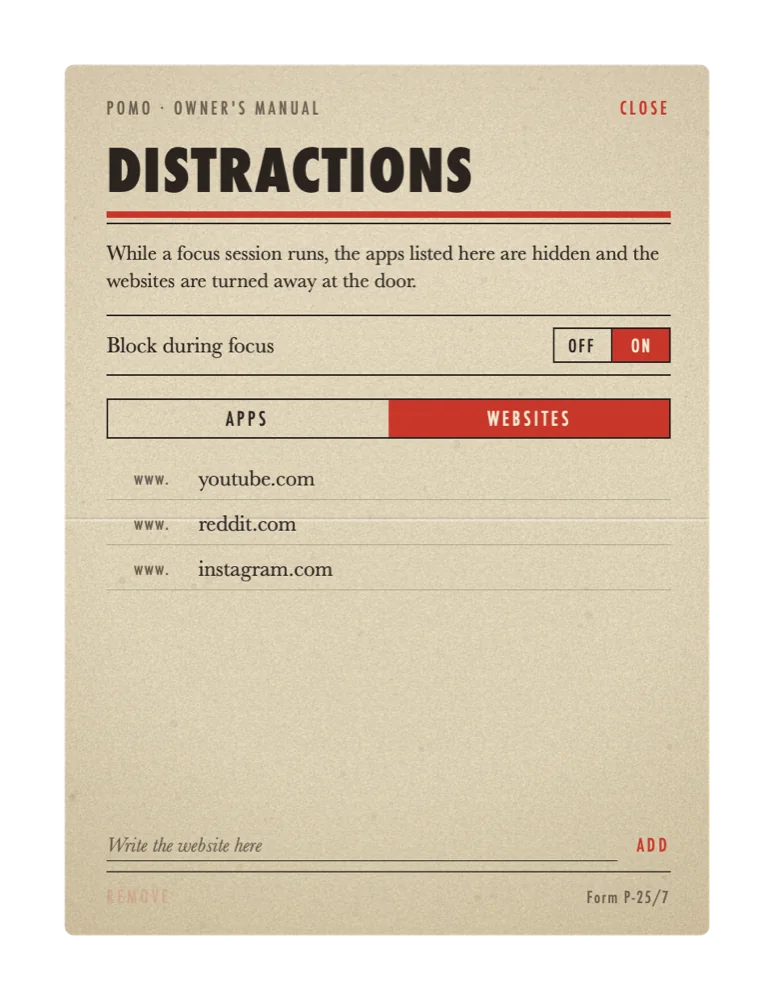
The shield on the timer window opens the distractions list. It has a column for websites, a column for apps, and a switch marked Block during focus. With the switch on, the list is enforced from the moment a focus session starts until the bell rings.
Apps are hidden
Pomo watches which app is in front. When an app on the list comes to the front, it is hidden at once and the timer window takes its place, with a line on the display such as Mail is blocked until your break. The app keeps running; its windows are simply out of reach. Bring it forward again and the same thing happens.
Websites are turned away
Every two seconds Pomo asks the front browser for the address of its current tab. If the host of that address is on the list, the tab is sent to about:blank. Other tabs stay where they are, and any site that is not on the list loads as usual. Pomo compares the host with the list and keeps nothing. No part of the address is stored or sent anywhere.
Off again on break
The door is tied to a running focus session. When the session ends and the lamp comes on, hidden apps can be brought back and listed websites open again for the whole of the short or long break. Pausing a session opens the door as well. It closes again when the next session starts.
Setting the list
Adding an app
Press Add app and choose one or more apps. Pomo remembers each one by its bundle identifier, so an app that is later renamed or moved still counts. Hiding apps needs no permission from macOS.
Adding a website
Write the host in the field, for instance youtube.com or news.ycombinator.com. A leading www. is dropped, and a listed host covers everything beneath it: youtube.com also turns away m.youtube.com and music.youtube.com. The reverse does not hold. List music.youtube.com and only that part of the site is shut. Paths after the host are ignored, so an entry blocks a whole site and cannot block a single page of it.
The permission macOS asks for
To read the address of a tab, Pomo has to ask the browser, and macOS allows that only with your consent. The first time a session runs with a website on the list, a dialog asks whether Pomo may control Safari, or Chrome, or whichever browser is in front. This is the Automation permission, and macOS asks it once for each browser. Answer Allow and websites are turned away in that browser from then on. Answer Don't Allow and apps are still hidden, while websites in that browser are left alone. The permission can be changed at any time in System Settings under Privacy & Security, then Automation.
Commitment mode and the fullscreen break
Two switches in the adjustments make the door harder to walk through. Neither is required for the blocker to work.
- Commitment mode. Pause, reset and skip are locked for the length of a focus session. The button on the timer and the menu bar item will take no such order until the bell. Since pausing is one way to open the door early, commitment mode also keeps the door shut for the full 25 minutes.
- Fullscreen break. When a break begins, it takes over the whole screen until it is over. The point is to make the five minutes a real pause rather than five minutes of reading in a smaller window.
Both switches sit behind the gear on the timer window, beside the bell, the metronome tick and the menu bar setting.
Limits
The blocker is a door. It closes on the reflex to check something, which is what most interruptions turn out to be. It is worth knowing where it ends.
- Mac only. Hiding apps and reading browser tabs are things an app may do on macOS and may not do on iPhone or iPad. The iPhone version of Pomo keeps the countdown on the Lock Screen and in the Dynamic Island; it does not hide or block other apps. The iPhone leaflet describes what it does instead.
- A determined person can get through. Quitting Pomo from the menu bar ends the session and opens the door. So does a browser missing from the supported list, or turning the Block during focus switch off. The blocker makes the detour long enough to notice what you are doing. A vault would be a different machine.
- Websites need a supported browser. Pomo can ask seven browsers for their current tab. In any other browser, listed websites load as usual.
- Only the front tab is checked. A listed site that is open in a background tab is left alone until it comes to the front, and then it is turned away within two seconds.
Specifications
- BrowsersSafari, Chrome, Arc, Brave, Edge, Vivaldi, Opera
- AppsAny app on the Mac, chosen from a file dialog
- Website matchingBy host; subdomains included; www. ignored
- Check intervalEvery two seconds, front tab of the front browser
- PermissionAutomation, once per browser; none for apps
- ActiveWhile a focus session runs; off on breaks and when paused
- Browsing data keptNone
- PlatformMac only, macOS 15 or later
- PriceFree, no account
Questions about the blocker are answered at the service counter. The method the timer follows is described in the Pomodoro Technique leaflet.