Pomo on Apple WatchPomodoro timer for Apple Watch
The appliance, reduced to fit the wrist: nameplate, split-flap display, lamps and the red button. The Watch app comes with the iPhone app, runs the countdown by itself, and taps you when an interval ends.
From the wrist
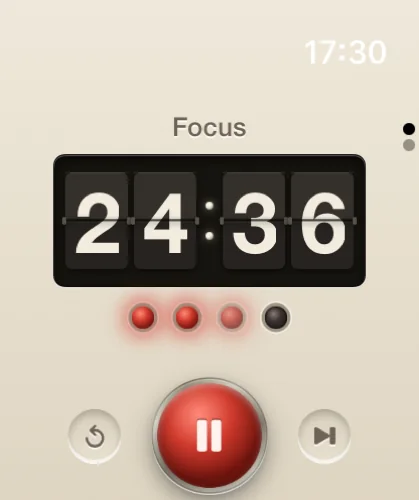
Raise the wrist and the timer is there. The nameplate shows the title of the session, the display flips the minutes and seconds, and the lamps fill as the cycle fills. Below them are three controls. The red button in the middle starts and pauses; the two small recessed buttons either side reset the session or skip to the next interval. Each press gives a click under the finger.
The Watch runs the standard cycle: 25 minutes of focus, 5 of break, and 15 after the fourth session. There is no door on the Watch, so to run other durations use the faders on the iPhone or the Mac, where each device keeps its own setting.
The tap
The Watch has no bell. When an interval ends it taps the wrist instead, and the next lamp comes on. The tap arrives whether the Watch is raised or not, which is the whole reason for having the timer there: on a walk, in a library, or anywhere a phone face-up on the desk would be the distraction, the end of the interval is felt rather than heard.
The same haptic engine answers every press of the button with a short click, so you know the order has been taken without looking at the display.
With the iPhone
The Watch app is installed with the iPhone app and is free. It keeps its own countdown, so a session started on the wrist runs there whether the phone is on the desk or in another room. When the interval ends, the Watch taps and enters the finished session in the record under the session's title.
The record is shared through iCloud. Swipe down from the timer and the page beneath shows today's pomodoros, the minutes focused, the streak, and the week's dots. Sessions finished on the Mac or the iPhone appear there once iCloud has carried them over, which takes minutes rather than seconds.
The countdown itself is kept on whichever device you pressed the button on. Start on the phone and the phone counts; start on the Watch and the Watch counts; each enters its finished sessions in the same record. For a session you want to control from both wrist and pocket, start it on the Watch and leave the phone be.
Requirements
- RequireswatchOS 10 or later
- SuppliedWith the iPhone app, at no charge
- ControlsStart, pause, reset, skip
- Cycle25 min focus · 5 min break · 15 min long break after 4
- SignalsA tap when an interval ends; a click on each press
- Second pageToday's pomodoros, minutes focused, streak
- CountdownRuns on the Watch itself
- RecordShared through iCloud with Mac, iPhone and iPad
- PriceFree. No account, no ads, no tracking.
The iPhone side of the pair is described in the iPhone and iPad leaflet.